
Turning Borrower Demand Into Clinic Prospects With HubSpot Custom Code

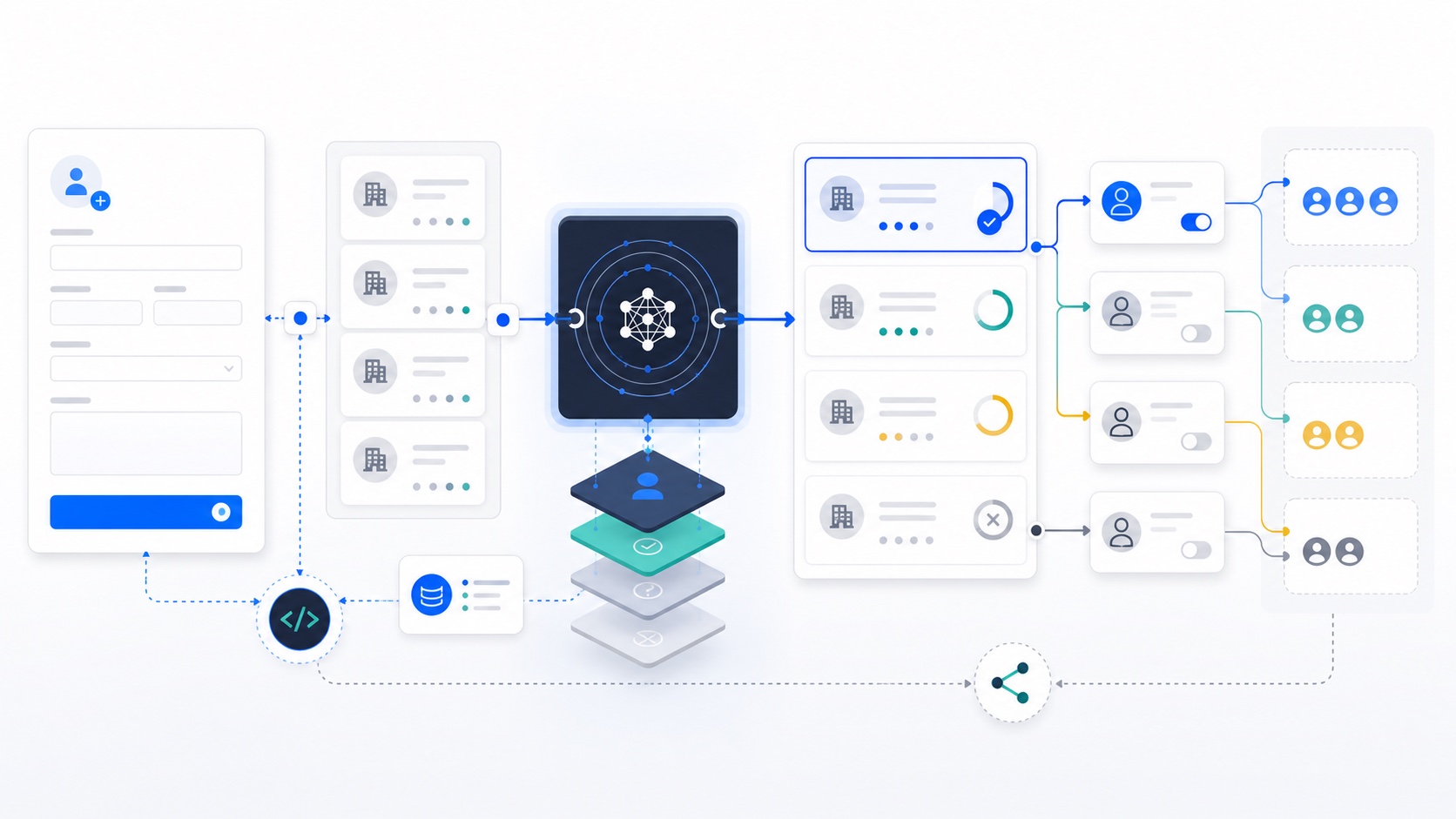
Table of contents
Introduction
Borrowers were trying to use Scratch Pay at veterinary clinics that were not Scratch Checkout partners yet.
If a borrower wanted financing for care but their clinic did not offer Scratch, the experience stopped at the exact moment intent was highest. That created a second problem for the business: Scratch had real demand for specific clinics, but no clean system for turning that demand into sales follow-up.
I built the HubSpot workflow and custom-code matching layer that turned those borrower referrals into clinic prospects for sales.
The system accepted borrower-submitted clinic information, searched HubSpot for an existing clinic record, scored possible matches, created missing records when needed, associated the right contact to the right company, stored referral metadata, and routed the clinic forward with demand context.
The technical work mattered because the sales motion only worked if the data was clean. "Your patients are asking for Scratch financing" is a strong outreach angle. Sending that message to the wrong clinic is not.
Business Problem
Scratch had organic borrower demand hiding inside the product experience.
A borrower wanted to finance care at a specific clinic. If that clinic was not already a Scratch Checkout partner, Scratch needed a way to capture the clinic, preserve the borrower context, and route the prospect to sales.
The workflow had to answer several questions:
- Does this clinic already exist in HubSpot?
- Does the submitted clinic match one known CRM record?
- Is there an associated contact we can use?
- If no company exists, should the system create one?
- What borrower and treatment context should follow the referral?
- Should the clinic enter sales outreach, review, or another path?
This was not a generic lead form.
It was a demand-capture system built from borrower behavior. The signal was specific: a borrower wanted Scratch Pay at this clinic for this type of care.
Clinic names made the matching problem harder. A borrower might submit "ABC Vet" while HubSpot stores "ABC Veterinary Clinic." Another borrower might know the clinic name but not the exact address. Chain clinics could share the same name across cities and states.
A fuzzy name match without location context could create false positives, and false positives were worse than no match because they could attach borrower demand to the wrong account.
The system needed more evidence.
Why Native Platform Features Weren't Enough
HubSpot workflows are strong for standard branching, property updates, and notifications. This needed more than "if clinic name contains X."
The workflow needed to:
- Normalize borrower-submitted clinic data
- Search HubSpot company records across multiple fields
- Compare clinic name, address, city, state, ZIP, and phone
- Score and rank possible matches
- Handle exact, probable, ambiguous, and absent matches differently
- Find or create a contact
- Associate the contact to the company
- Return structured outputs for downstream workflow branches
- Preserve borrower name, treatment type, and referral source for sales context
HubSpot custom code actions were the right tool because the decision needed JavaScript and API logic inside the workflow. HubSpot still handled intake, orchestration, property updates, routing, and sales follow-up. The code handled the matching layer that native branches could not handle cleanly.
The business did not need another cold list. It needed a way to turn borrower demand into a cleaner clinic prospecting motion.
Solution Architecture
The architecture kept HubSpot as the operating layer and used custom code as the matching engine.
Borrower form submission
  - clinic name
  - street address
  - city
  - state
  - ZIP
  - phone
  - contact name
  - contact email
  - borrower name
  - treatment type
        |
        v
HubSpot workflow trigger
        |
        v
Custom code matching action
  - normalize submitted fields
  - search existing companies
  - score and rank candidates
  - find or create contact
  - associate contact to company
  - return match metadata
        |
        v
Workflow continuation
  - update referral properties
  - set clinic prospect status
  - enroll into sales sequence or route for review
  - give sales borrower-demand context
The custom code returned a match class instead of a simple true or false value.
exact_match
probable_match
ambiguous_match
created_new
That distinction mattered because every state required a different operational response. A confident match could continue into outreach. An ambiguous match needed review. A new clinic needed company and contact creation before sales could act on it.
Technical Implementation
The form captured the minimum fields needed to make the match reliable enough:
- Clinic name
- Street address
- City
- State
- ZIP code
- Phone number
- Contact name
- Contact email
- Borrower name
- Treatment type
- Referral source
The workflow triggered from the HubSpot form submission and passed those fields into custom code.
The first step was normalization. Borrower-submitted data is never clean enough to compare directly.
function normalizeName(value) {
  if (!value) return "";

  return value
    .toLowerCase()
    .replace(/[^a-z0-9 ]/g, "")
    .replace(/\b(the|dr|drs|vet|veterinary|clinic|hospital|animal|pet|llc|inc|pllc|dvm)\b/g, "")
    .replace(/\s+/g, " ")
    .trim();
}

function normalizePhone(value) {
  return (value || "").replace(/\D/g, "").slice(-10);
}

function normalizeZip(value) {
  return (value || "").substring(0, 5);
}
The matching flow looked like this:
1. Normalize submitted clinic name, address, phone, state, and ZIP.
2. Search HubSpot for exact or near-exact company matches.
3. If exact name returns multiple records, use address data to disambiguate.
4. If exact match fails, search by name tokens and ZIP.
5. Score candidates using name, address, and phone evidence.
6. Accept strong matches, flag ambiguous matches, or create a new company and contact.
7. Return company ID, contact ID, match tier, and score to HubSpot.
The scoring model was intentionally explainable. It did not need machine learning. It needed a transparent decision that sales and operations could trust.
function scoreCandidate(input, company) {
  let score = 0;

  if (input.phone && input.phone === company.phone) score += 35;
  if (input.zip && input.zip === company.zip) score += 25;
  if (input.state && input.state === company.state) score += 10;
  if (input.city && input.city === company.city) score += 10;
  if (nameSimilarity(input.name, company.name) > 0.9) score += 25;
  if (nameSimilarity(input.name, company.name) > 0.75) score += 15;

  return score;
}
The output fields gave the rest of the workflow enough context to continue.
{
  "companyId": "12345",
  "contactId": "67890",
  "matchFound": true,
  "matchTier": "probable_match",
  "matchScore": 82
}
Once the match was resolved, HubSpot updated referral properties such as borrower name, treatment type, referral source, and clinic prospect status. That gave sales the context behind the lead instead of dropping a cold company record into the CRM.
Sales Routing and Outreach Context
The sales value came from the context.
This was not "we found a clinic that might be a fit." It was closer to: "A borrower tried to use Scratch financing at your clinic."
That gave the sales team a reason to reach out with a stronger angle:
Borrower demand captured
        |
        v
Clinic matched or created in HubSpot
        |
        v
Referral metadata added
  - borrower name
  - treatment type
  - referral source
        |
        v
Sales outreach
  - clinic has borrower demand
  - treatment context is known
  - sales can prioritize warm accounts
The workflow could support outreach like:
Your patients are asking for Scratch financing.That is a different sales motion than generic prospecting. The clinic was not being contacted because it matched a broad ICP list. It was being contacted because a borrower had already raised their hand.
Engineering Decisions & Tradeoffs
The first tradeoff was form friction versus match quality. More fields can reduce completion. Too few fields make the match unreliable. I chose a small set of high-signal fields because the system needed enough evidence to avoid attaching demand to the wrong clinic.
The second tradeoff was deterministic scoring versus machine learning. A weighted model was easier to debug, easier to explain, and sufficient for the operational need. When the workflow made a decision, the team could understand why.
The third tradeoff was automation versus review. Some submissions should not trigger automated outreach. If multiple clinics had similar names in the same region, the safe behavior was to preserve the referral and route it for review.
The fourth tradeoff was record creation. Creating a new company for every referral can pollute the CRM. Creating nothing loses the demand signal. The system created or routed records only after matching logic failed to find a credible existing clinic.
Failure handling favored safe defaults:
- If CRM search failed, route for review instead of sending.
- If multiple companies had close scores, mark ambiguous.
- If no usable contact existed, create or route the contact path instead of dropping the referral.
- If the score was below threshold, do not treat it as a confident match.
That is the right bias for lifecycle systems connected to CRM data. When uncertain, protect the customer experience and the CRM.
Lessons Learned
The first lesson is that borrower behavior can become sales infrastructure. A borrower asking for Scratch at a clinic is a cleaner signal than a cold account list because it comes from real demand.
The second lesson is that names are identifiers only in small demos. In production CRMs, names are hints. Address, ZIP, city, state, phone, and associations produce better evidence.
The third lesson is that confidence tiers are more useful than binary matches. Exact, probable, ambiguous, and created-new are operationally different states. A workflow should preserve those distinctions.
The fourth lesson is that custom code actions are best used as decision engines, not entire applications. HubSpot still handled form intake, workflow branches, CRM updates, routing, and sequence enrollment. The custom code handled the part that needed code.
For more on lifecycle systems that connect behavior, CRM state, and revenue movement, read How to Build a Customer Lifecycle Marketing Strategy From Scratch.
Closing Thoughts
This build worked because it treated a borrower referral as structured demand, not just a form submission.
The system captured the clinic a borrower wanted to use Scratch Pay at, matched or created the right HubSpot records, preserved borrower and treatment context, and routed the prospect to sales.
That is the broader lifecycle engineering pattern: when customer behavior reveals demand, the CRM should know how to capture it, clean it, and turn it into the next useful action.
Get one retention idea, every other week
The Lifecycle Letter. One actionable retention idea in your inbox, no fluff, unsubscribe anytime.