
Building an AI Sales Intelligence Platform for 77 Reps and 23,000 Prospects

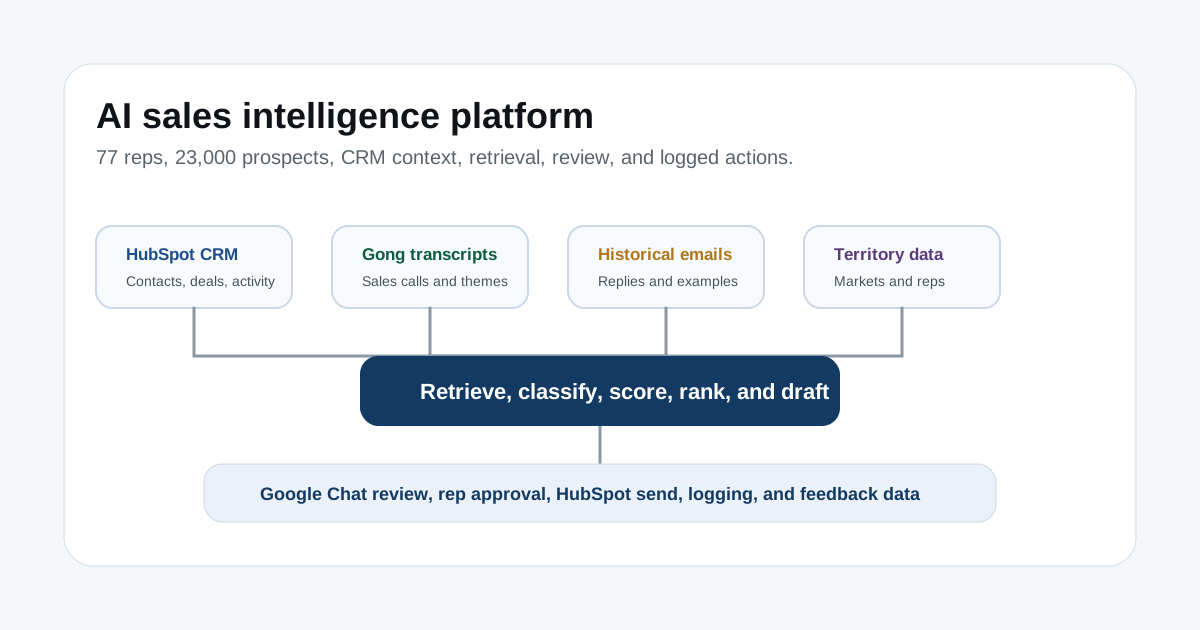
Table of contents
- Executive summary
- Sales workflow problem
- Platform architecture
- Building the retrieval and context layer
- Automating inbound reply classification
- Inbound processing architecture
- Designing human approval in Google Chat
- Feedback loop for replies
- Building multi-signal prospect qualification
- Hard filters versus scoring
- Daily representative queue
- Generating representative-specific outreach
- Representative review and queue limits
- Territory and field-visit intelligence
- Field-visit workflow
- Per-representative personalization
- Feedback and evaluation
- Safety, control, and governance
- Technical and organizational tradeoffs
- Lessons learned
Executive summary
Scratch had a sales organization with about 77 representatives and more than 23,000 potential prospects.
The sales workflow had a familiar problem: reps spent too much time researching, sorting, drafting, classifying replies, planning visits, and updating CRM activity before they could do the actual selling.
I designed and built an AI-powered sales intelligence platform to support that workflow.
This was not a chatbot. It was a human-in-the-loop sales workflow and decision-support system that turned CRM data, historical conversations, customer signals, rep context, and territory data into prioritized sales actions and review-ready communication.
The platform used:
- Next.js and React for the frontend.
- Supabase and PostgreSQL for backend data and authentication.
- Claude for classification and generation.
- HubSpot APIs for CRM, conversations, contacts, companies, deals, email, and sequence workflows.
- Gong transcripts.
- Historical HubSpot email data.
- Google Chat webhooks for approvals.
- HubSpot sending infrastructure.
- A retrieval-based knowledge system with about 214,000 chunks.
The guiding principle was control. The platform could classify, retrieve, score, rank, draft, and recommend. A representative still approved what went out.
Sales workflow problem
Representatives had to do too many repetitive steps before reaching a real customer conversation.
They had to:
- Build lists.
- Research prospects.
- Decide who was worth contacting.
- Write personalized emails.
- Read inbound replies.
- Classify intent.
- Draft responses.
- Schedule meetings.
- Plan territory visits.
- Update CRM activity.
None of that is fake work. It all matters.
The issue is that much of it follows patterns. If the CRM already knows the company, the territory, prior conversations, product fit, deal context, historical email activity, and related sales-call language, the system should help the rep make a better next decision faster.
Platform architecture
The platform connected data, retrieval, AI, approval, sending, and CRM logging.
HubSpot CRM
  +
Gong transcripts
  +
Historical emails
  +
Rep configuration
  +
Territory data
  |
  v
Normalization and retrieval layer
  |
  v
Lead, deal, borrower, and rep context
  |
  v
Classification, scoring, ranking, and generation
  |
  v
Google Chat or dashboard review
  |
  v
Approve, edit, deny, send, sequence, or escalate
  |
  v
HubSpot logging and outcome capture
  |
  v
Feedback and performance analysis
The system had three major subsystems:
- AI Reply Bot.
- Multi-signal lead qualification and outbound generation.
- Territory intelligence and field-visit optimization.
Shared platform capabilities connected them: retrieval, rep profiles, feedback data, governance, and evaluation.
Building the retrieval and context layer
The knowledge base contained about 214,000 chunks from Gong call transcripts and historical HubSpot email conversations.
The retrieval layer helped surface:
- Similar objections.
- Prior useful explanations.
- Customer language.
- Product questions.
- Sales themes.
- Representative communication patterns.
A retrieval system does not guarantee truth.
It gives the AI context to work from, and it gives the representative a way to see why a draft was suggested. The review interface should cite or reference source material so the rep can inspect the basis of the answer.
The retrieval design needed to account for:
- Chunking.
- Semantic retrieval.
- Metadata.
- Rep filters.
- Product filters.
- Topic filters.
- Recency.
- Access control.
- Personally identifiable information.
- Stale content.
- Conflicting answers.
- Retrieval evaluation.
- Source visibility in the review interface.
The system could not treat every historical answer as approved truth. Some answers age out. Some are context-specific. Some may conflict. That is why human review and escalation still matter.
Automating inbound reply classification
Inbound reply handling had a repeated workflow:
Read message
  |
  v
Interpret intent
  |
  v
Look up customer and deal context
  |
  v
Decide response
  |
  v
Draft reply
  |
  v
Send and log
That can take five to ten minutes per message.
Across a large sales team, that time adds up fast.
The AI Reply Bot classified inbound messages into four operational buckets:
- Question.
- Objection.
- Meeting scheduling.
- Too complex.
Question
Questions could involve terms, timelines, interest rates, approval, documentation, or product process.
The system retrieved trusted answers and combined them with customer-specific context.
Objection
Objections could involve rate concerns, timeline concerns, competitor consideration, product hesitation, or lack of urgency.
The system retrieved relevant objection-handling material and used deal context to draft a response.
It should not claim rate-matching authority, concessions, or policy exceptions unless those actions are actually approved.
Meeting scheduling
If the customer wanted to talk live, the system prepared the scheduling path.
That could use representative availability or HubSpot meeting data where available.
Too complex
Some messages should not be answered by an automated draft.
Examples include legal matters, fraud concerns, multiple interconnected loans, unclear situations, and questions outside the approved knowledge boundary.
Abstention is not failure. It is a product feature.
Inbound processing architecture
The inbound flow looked like this:
New HubSpot conversation message
  |
  v
Webhook receives message
  |
  v
Extract body, subject, sender, conversation ID, and CRM context
  |
  v
Normalize message body
  |
  v
Retrieve recent conversation and deal context
  |
  v
Classify intent
  |
  v
Retrieve relevant knowledge
  |
  v
Draft response
  |
  v
Route to assigned representative
The details matter:
- Webhook verification.
- Duplicate-event prevention.
- Message threading.
- Signature stripping.
- Quoted-text removal.
- HTML-to-text normalization.
- Contact matching.
- Deal association.
- Recent-message context.
- Knowledge retrieval.
- Classification confidence.
- Escalation rules.
- Sensitive-data handling.
Without those pieces, the AI layer is working on messy inputs. Messy inputs create bad drafts.
Designing human approval in Google Chat
The approval message included:
- Original customer message.
- Classification.
- Relevant context.
- Draft response.
- Approve action.
- Edit action.
- Deny action.
The representative could approve, edit, or deny.
Approve sent and logged the response.
Edit allowed the representative to modify the draft before sending. The system could store both the original draft and final version.
Deny stopped the response. The denial reason could be stored for review.
This layer gave the system:
- Human accountability.
- Quality control.
- Regulatory protection.
- Trust.
- Feedback data.
- Faster action without autonomous sending.
The approval step was not a compromise. It was the thing that made the workflow usable for real sales communication.
Feedback loop for replies
Every review action created structured feedback:
- Classification accepted or corrected.
- Draft approved.
- Draft edited.
- Draft denied.
- Edit distance.
- Changed phrases.
- Final outcome.
- Response time.
- Representative.
- Message category.
That data can improve prompts, retrieval, evaluation, and future model selection.
It should not be casually described as automatic model training after every edit. A safer and more accurate framing is that edits become evaluation and improvement data.
Building multi-signal prospect qualification
Static qualified lists still leave work for the representative.
The rep still has to decide:
- Which prospects fit the territory?
- Which prospects show real intent?
- Which accounts match the product?
- Which accounts deserve immediate outreach?
- What message should go out?
- Should this be one email or a sequence?
The platform replaced static list distribution with a recurring scoring and prioritization workflow.
Potential inputs included:
- HubSpot company data.
- Practice location.
- Practice size.
- Practice-management system.
- Prior interactions.
- Website behavior.
- Email engagement.
- Form activity.
- Product interest.
- Enrichment providers.
- Practice specialties.
- Multi-location status.
- Competitor history.
- Public review signals.
Enrichment providers and review scraping should be labeled as proposed or conditional unless the specific source was confirmed in production.
Hard filters versus scoring
Hard filters determine whether a prospect is eligible.
Examples:
- Territory.
- Practice type.
- Product fit.
- Existing customer status.
- Active opportunity status.
- Suppression status.
- Contactability.
Scoring ranks eligible prospects by priority.
Illustrative scoring signals could include:
- Multi-veterinarian practice.
- No current financing option.
- Emergency or specialty practice.
- Recent pricing-page visit.
- Repeated email engagement.
- Cost-related public-review signals.
- Multi-location group.
- Explicit demo request.
- Known competitor churn.
Those examples should not all be presented as confirmed production logic unless they were verified.
The model should separate "can contact" from "should prioritize."
Prospect record
  |
  v
Hard filters
  |
  +-- ineligible
  |     |
  |     v
  |   suppress
  |
  +-- eligible
        |
        v
      score and rank
Daily representative queue
The recurring job looked like this:
Pull eligible CRM prospects
  |
  v
Apply hard filters
  |
  v
Enrich available records
  |
  v
Calculate score
  |
  v
Assign tier
  |
  v
Apply territory ownership
  |
  v
Select top accounts per representative
  |
  v
Queue for outreach generation
The implementation had to consider:
- HubSpot API batching.
- Pagination.
- Rate limits.
- Incremental updates.
- Idempotency.
- Missing data.
- Score recalculation.
- Ownership conflicts.
- Territory reassignment.
- Suppression.
- Queue limits.
- Audit logs.
Prospects could be grouped into operational tiers:
- Tier 1 for immediate representative attention.
- Tier 2 for nurture and periodic review.
- Tier 3 for long-term nurture and future rescoring.
The tier thresholds should be validated against opportunities and closed-won outcomes. They should not be chosen only because the numbers look clean.
Generating representative-specific outreach
The outbound generator used:
- Practice name.
- Location.
- Size.
- Specialty.
- Triggered signals.
- Prior engagement.
- Product fit.
- Representative identity.
- Historical communication.
- Relevant Gong and email examples.
The output needed to:
- Use a specific, supportable observation.
- Focus on a likely business problem.
- Connect that problem to the appropriate Scratch product.
- Use a clear call to action.
- Stay concise.
- Match the representative's communication style.
- Avoid unsupported claims.
- Avoid fabricated research details.
That last point matters.
Personalization is only useful if it is true. Presenting inferred or scraped information as fact creates trust risk.
Representative review and queue limits
The representative could:
- Approve the message.
- Edit it.
- Deny it.
- Delay it.
- Select a different contact.
- Enroll the prospect into a sequence.
- Change the recommended product.
- Record why the recommendation was wrong.
A daily volume cap such as 50 messages per representative can protect review quality and sender reputation.
The platform should not reward flooding the rep with drafts they cannot review carefully.
Territory and field-visit intelligence
Field representatives often plan travel with incomplete information.
The platform needed to compare:
- Pipeline concentration.
- Number of opportunities.
- Average deal value.
- Recent engagement.
- Meeting potential.
- Travel cost.
- Representative capacity.
The territory model grouped prospects and open opportunities by city, ZIP code, metro area, or sales territory.
It could calculate:
- Total open pipeline.
- Opportunity count.
- Average opportunity value.
- High-priority prospect count.
- Recent engagement.
- Estimated or entered travel cost.
A simple ratio can compare pipeline value with travel cost, but that should not be treated as literal expected return. Real visit ROI also depends on probability, close rate, rep time, and deal quality.
Field-visit workflow
The visit workflow looked like this:
Representative selects market
  |
  v
System retrieves local prospects and opportunities
  |
  v
Rank accounts by value, score, engagement, and fit
  |
  v
Display contacts and recommended actions
  |
  v
Generate visit-specific outreach
  |
  v
Representative reviews batch
  |
  v
Send and track meetings
Visit-specific outreach can use the fact that the representative will be nearby as a relevant reason for contact.
The system should not falsely claim a trip exists before the representative confirms it.
The workflow needed:
- Visit-date input.
- Geographic radius.
- Account prioritization.
- Existing relationship state.
- Contact-role selection.
- Batch review.
- Meeting-link integration.
- Outreach suppression.
- Post-visit tracking.
Per-representative personalization
Each representative could have a configuration profile:
- Territory.
- Product focus.
- Preferred tone.
- Historical communication examples.
- Performance context.
- Review preferences.
- Daily capacity.
Rep personalization should be based on approved patterns and feedback, not a caricature of a person's style.
The goal is to make the draft sound like something the rep could reasonably send, while staying inside product, compliance, and brand constraints.
Feedback and evaluation
The platform captured:
- Approvals.
- Edits.
- Denials.
- Classification corrections.
- Sends.
- Opens.
- Replies.
- Meetings.
- Opportunities.
- Closed outcomes.
Evaluation had three layers.
Model evaluation
- Classification accuracy.
- Escalation quality.
- Unsupported-claim rate.
- Retrieval relevance.
- Draft acceptance rate.
Workflow evaluation
- Time to response.
- Review time.
- Queue completion.
- Representative adoption.
- CRM logging completeness.
Business evaluation
- Reply rate.
- Meeting rate.
- Opportunity conversion.
- Pipeline creation.
- Close rate.
- Representative time saved.
Correlation should not be described as full causality. If a rep closes a deal after using an AI draft, the platform may have helped, but downstream revenue still depends on many other factors.
Safety, control, and governance
The platform needed controls:
- Human approval.
- Role-based access.
- CRM permissions.
- Webhook security.
- Secret management.
- Audit logs.
- Rate limiting.
- Prompt-injection protection.
- Retrieval poisoning prevention.
- Unsupported-claim checks.
- Sensitive financial information handling.
- Legal and fraud escalation.
- Message suppression.
- Email compliance.
- Representative accountability.
- Emergency shutdown.
- Manual fallback.
Sales AI is useful only if the team trusts it.
Trust comes from showing the rep the source context, making edits easy, logging decisions, and escalating when the system should not answer.
Technical and organizational tradeoffs
Automation speed has to be balanced with representative control.
Personalization can improve relevance, but it increases fabrication risk.
A large retrieval index gives more context, but relevance becomes harder.
Static scoring is easier to explain. Learned prediction can get stronger with validation, but it needs data discipline.
Per-rep customization improves adoption, but it increases maintenance.
High message volume creates more opportunities, but it can lower review quality.
AI recommendations have to respect territory rules.
Pipeline value is not the same as visit ROI.
Model confidence should never override mandatory escalation.
Learning from edits has to respect user privacy and governance.
Lessons learned
Sales AI works better when it is built around the rep's actual workflow.
Inbound reply drafting, outbound prioritization, and territory planning are connected problems. They all need customer context, rep context, product knowledge, and CRM state.
Human approval is what turns AI output into a usable workflow.
Retrieval should support the draft, not pretend to guarantee truth.
Scoring needs hard filters before ranking.
Territory intelligence should make travel decisions clearer without pretending it can calculate exact ROI.
The platform's value came from combining data engineering, CRM architecture, workflow automation, language models, human review, geographic intelligence, and measurable sales operations.
That is a different thing from asking AI to write a cold email.
Get one retention idea, every other week
The Lifecycle Letter. One actionable retention idea in your inbox, no fluff, unsubscribe anytime.