
Protecting Deliverability During Zendrop's ActiveCampaign-to-HubSpot Migration

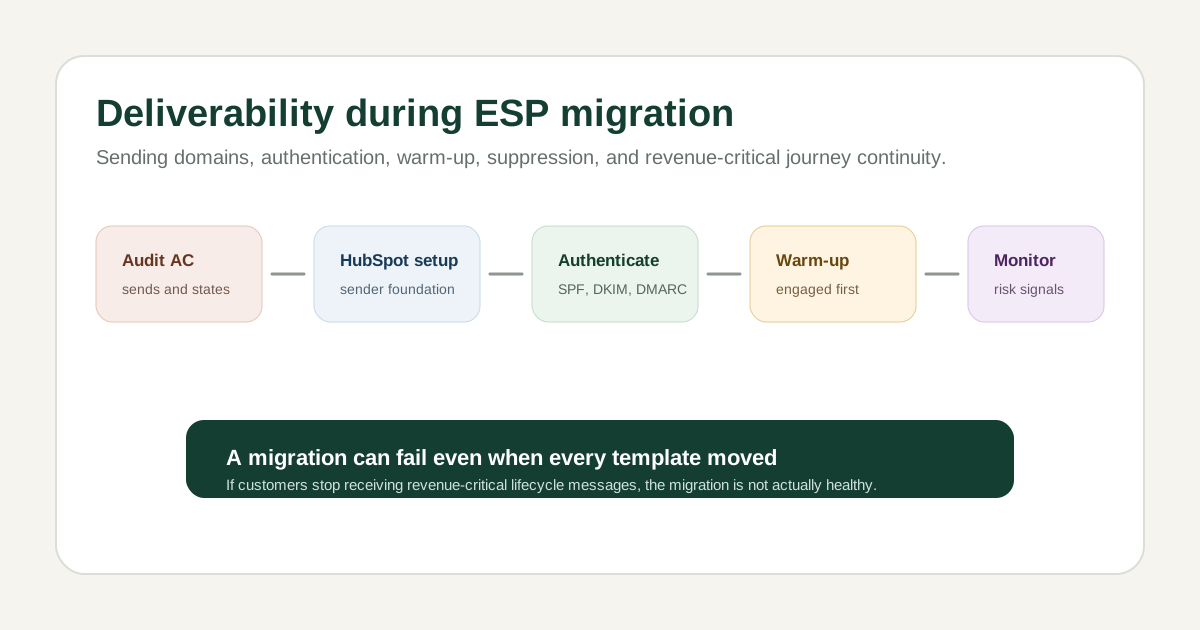
Table of contents
- Executive summary
- Why the ESP migration created deliverability risk
- Auditing the existing sending environment
- Configuring HubSpot infrastructure
- Authentication and domain alignment
- Audience preparation
- Controlled warm-up and migration sequencing
- Workflow continuity and duplicate prevention
- Monitoring and risk management
- Revenue-critical journey migration matrix
- Lessons learned
Executive summary
Zendrop's migration from ActiveCampaign to HubSpot was not only a CRM migration.
The company depended on lifecycle email for onboarding, trial conversion, activation, webinars, upsells, promotional revenue, retention, and sales support. If deliverability broke during the move, the migration could damage revenue even if every workflow looked correct inside HubSpot.
I worked on the sending infrastructure side of the migration: sending domains, DNS authentication, warm-up support, sender-reputation protection, subscription and suppression preservation, and controlled movement of revenue-critical programs.
This case study explains deliverability as migration architecture.
Why the ESP migration created deliverability risk
Teams often treat an ESP migration like a content and automation project.
Move the lists. Rebuild the templates. Recreate the workflows. Turn off the old platform.
That misses the infrastructure risk.
Changing platforms can hurt the business when the sending environment is not ready:
- Sending from an improperly authenticated domain.
- Moving too much volume too quickly.
- Sending to inactive or risky contacts.
- Creating inconsistent subscription states.
- Duplicating sends across old and new platforms.
- Breaking suppression logic.
- Pausing revenue-critical journeys.
- Damaging inbox placement during the transition.
Zendrop had too much lifecycle revenue tied to messaging for deliverability to be a final checklist item.
Auditing the existing sending environment
The migration had to start with an audit.
The important questions were:
- Which domains and sender identities were in use?
- Which lists and segments were active?
- Which automations were revenue-critical?
- Which contacts were subscribed or suppressed?
- Which audiences were engaged, inactive, risky, or invalid?
- Which sends needed to continue during the move?
- Which ActiveCampaign workflows could conflict with HubSpot workflows?
The audit created the map for sequencing.
Current ActiveCampaign environment
  |
  v
Lists, segments, automations, senders
  |
  v
Subscription and suppression states
  |
  v
Priority journey map
  |
  v
HubSpot migration sequence
The goal was continuity without creating duplicate sends.
Configuring HubSpot infrastructure
HubSpot needed a trusted sending setup before major volume moved.
That meant configuring sending domains and establishing authentication before shifting important campaigns.
The exact DNS values are not listed here because they depend on the platform and domain setup. The roles are what matter:
- SPF helps receiving mail servers know which systems can send for the domain.
- DKIM signs messages so receiving servers can verify they were not altered.
- DMARC tells receiving servers how to treat mail that fails authentication checks.
- Branded sending domains help align the visible sender with the authenticated infrastructure.
Authentication does not guarantee inbox placement. It creates the minimum trust foundation.
Without it, the rest of the lifecycle system sits on bad ground.
Authentication and domain alignment
Domain alignment matters because mailbox providers evaluate the sender identity, authentication, and reputation together.
The practical architecture looked like this:
Zendrop sender identity
  |
  v
Branded sending domain
  |
  v
SPF, DKIM, and DMARC configured
  |
  v
HubSpot sending environment
  |
  v
Mailbox provider evaluation
The job was not to memorize DNS acronyms.
The job was to make sure Zendrop could keep reaching users after the migration.
Audience preparation
Audience quality affects migration risk.
A new sending environment should not start by blasting every contact, especially if the database includes inactive users, invalid addresses, unsubscribes, bounces, or old promotional segments.
The audience model considered:
- Recent engagement.
- Subscription status.
- Bounce history.
- Spam complaints.
- Suppression status.
- Contact validity.
- Business importance.
The risk model looked like this:
High trust
  - recently engaged
  - subscribed
  - low complaint risk
  - high business value

Medium trust
  - older engagement
  - subscribed
  - no known hard suppression

High risk
  - inactive
  - bounced
  - complaint history
  - uncertain permission
Starting with better audiences helps protect the new sending environment.
Controlled warm-up and migration sequencing
The team should not move every campaign and every contact at once.
The controlled sequence looked like this:
Audit current sending environment
  |
  v
Configure HubSpot sending infrastructure
  |
  v
Authenticate sending domains
  |
  v
Validate subscription and suppression data
  |
  v
Segment contacts by engagement and risk
  |
  v
Begin controlled sending
  |
  v
Move priority lifecycle programs
  |
  v
Monitor delivery and engagement
  |
  v
Increase volume gradually
  |
  v
Retire conflicting ActiveCampaign sends
This sequencing protected revenue-critical communication while the new environment built trust.
Workflow continuity and duplicate prevention
Deliverability is connected to workflow architecture.
If ActiveCampaign and HubSpot both send to the same customer, the customer experience suffers and sender reputation can suffer with it.
The migration had to account for:
- ActiveCampaign and HubSpot transition timing.
- Which platform owned each journey.
- Enrollment suppression.
- Duplicate-message prevention.
- Transactional versus promotional communication.
- Revenue-critical workflow continuity.
The duplicate-send logic looked like this:
Journey ready in HubSpot?
  |
  +-- no:
  |     keep ActiveCampaign owner active
  |
  +-- yes:
        validate HubSpot QA
        pause or retire ActiveCampaign owner
        enroll eligible contacts in HubSpot
        monitor sends
The point was to avoid a messy middle where both systems acted like they owned the same customer state.
Monitoring and risk management
The migration needed monitoring after launch.
The key signals were:
- Delivery rates.
- Hard bounces.
- Soft bounces.
- Spam complaints.
- Unsubscribes.
- Engagement trends.
- Domain reputation.
- Workflow-specific drops.
- Audience-specific issues.
The monitoring framework looked like this:
Send activity
  |
  v
Delivery and bounce signals
  |
  v
Complaint and unsubscribe signals
  |
  v
Engagement trends
  |
  v
Workflow and audience review
  |
  v
Volume and sequencing decisions
No exact performance outcome is claimed here. The purpose was risk control and continuity.
Revenue-critical journey migration matrix
The migration needed a priority view.
Journey type          Business risk        Migration priority
Onboarding           Activation           High
Trial conversion     Revenue              High
Webinar reminders    Attendance           High
Promotions           Revenue              High
Retention            Churn prevention     High
General nurture      Engagement           Medium
Low-engagement sends Reputation risk      Controlled
This matrix helped decide what moved first and what needed extra caution.
Lessons learned
Deliverability is infrastructure.
It affects activation, conversion, retention, sales outreach, promotional revenue, and customer trust. A migration can be technically complete and still fail if customers stop receiving the messages the business depends on.
Authentication matters, but it is only the foundation. Audience quality, sequencing, suppression, workflow ownership, and monitoring decide whether the move holds up.
The safest migration is not the fastest migration. The safest migration is the one that preserves customer state and revenue-critical communication while the new platform earns trust.
Get one retention idea, every other week
The Lifecycle Letter. One actionable retention idea in your inbox, no fluff, unsubscribe anytime.